An art robot can turn a digital image into a physical drawing, painting, or carved surface. The software decides what marks to make, while motors guide the tool across the material. That division makes these systems useful, but it also creates questions about authorship, safety, and control.
- Software turns an image or prompt into a planned tool path.
- Motors repeat the same movement with steady speed and pressure.
- Human review still matters when the source image, material, or setting changes.
How an art robot works
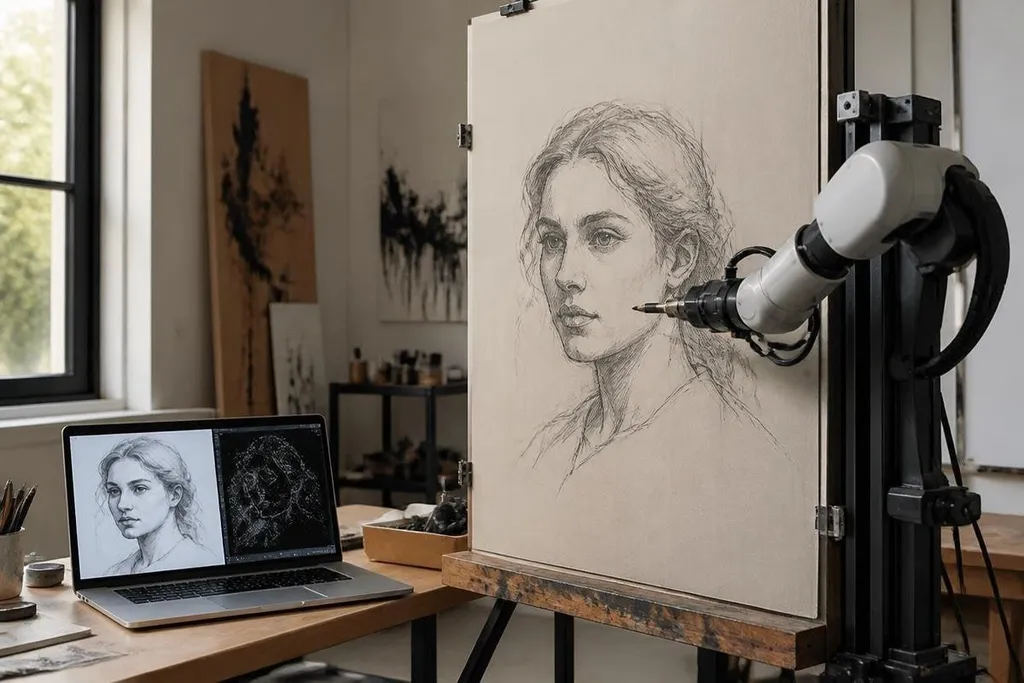
The process starts with an input image or a set of rules. Software breaks that input into lines, colors, shapes, or movement instructions. The robot then follows those instructions through a controller linked to its motors.
The tool at the end of the arm is called an end effector. For art work, it might hold a brush, pen, spray head, cutter, or marker. The choice changes the result because each tool leaves a different line and needs a different amount of pressure.
It can repeat a path without tiring or losing focus. That helps when an artist needs several copies of one design, or when the work must fit a fixed wall, panel, or sheet. It also lets a person test changes in software before using paint or other costly material.
The robot still needs clear limits. A path that works on paper may fail on canvas, wood, stone, or a surface with uneven height.
The controller follows its instructions; it doesn't know that a brush has dried out unless a sensor or a person catches the problem.
Where the benefits are real
Repeatability is the clearest benefit. A robot can draw the same shape across many pieces with similar timing and motion. That matters for installations, product decoration, and teaching, where the process needs to be recorded and repeated.
Robots can also handle movements that are tiring for a person. Long lines, repeated dots, and steady spray patterns may become easier to manage when the arm carries the tool. A person can then spend more time choosing the image, checking the surface, and changing the design.
Software control adds another useful step. An artist can save a tool path, adjust its speed, or change the order of marks. The saved file can also show how the physical work was made, which gives a gallery, school, or buyer a clearer record of the process.
A saved tool path raises a larger question: how much control should software have over physical marks? Robot24.com's robotics coverage places that question beside autonomous systems and industrial machines before the risks begin.
Where the risks begin
The first risk is authorship. If software creates the image and a robot makes the marks, several people or systems may have shaped the result. A clear record should name the person who set the goal, the software used, and the role played by the robot.
Copyright questions can follow the input image. A person may feed a protected image into a system without having permission to copy or alter it. The machine doesn't remove that responsibility; it only makes the output physical.
Safety needs attention too. An arm carrying a brush is still a moving machine. A cutter, spray head, or heated tool can hurt someone, and a wrong path can damage the work surface. The work area needs physical barriers or safe spacing, a stop control, and a clear way to pause the robot.
There is also a quality risk. Software can produce a clean image, but clean marks are not the same as a useful artistic choice. The system may repeat a mistake across every copy, especially when a sensor misses surface height, tool pressure, or a change in material.
The cost of setup can also change the decision. You may need the robot, tool, controller, software, safety equipment, and time to set the process up. A small project may take longer with a robot than with a person holding the same brush.
I’d use an art robot for repeatable physical work, but I’d keep a person responsible for the source, the settings, and the final check.
A practical check before you buy or build
Use this list before a robot touches paint, ink, or a cutting tool:
- Name the maker: Record who chose the image, set the instructions, and approved the result.
- Check the source: Confirm that you can use the image, training data, or design file.
- Test the surface: Run a small sample on the same material and finish as the final work.
- Set safe limits: Mark the work area, test the stop control, and keep people away from moving parts.
- Record the process: Save the software version, tool path, tool type, and changes made during production.
- Inspect each result: Check for dried tools, blocked nozzles, missed marks, and repeated errors.
The useful question is not whether a robot can make art. It can make marks from a plan. The harder question is who owns the plan, who checks the machine, and what the artist adds when the first result needs to change.